


Epic Freebie Games Radar
4.4519.00 Reviews
App Specs
- Version
- 6.5.0
- Updated On
- License
- Free
- Downloads
- 5,000,000+
- Developer
- Arioch Pds - Apps & Games
- Categories
- Events
- Platform
- Android
Screenshots
 Analysis by AppCompare
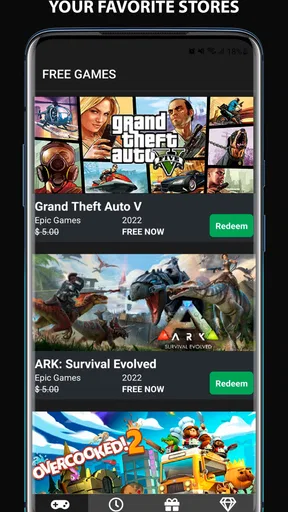
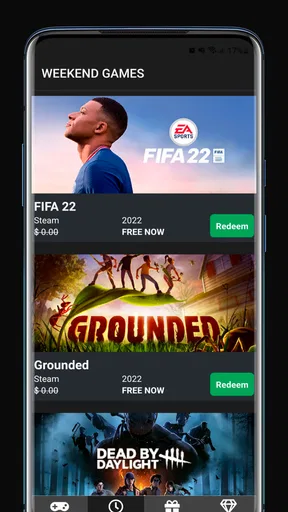
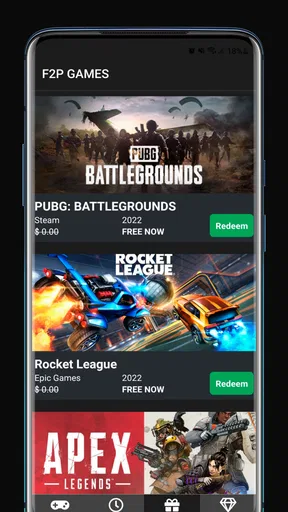
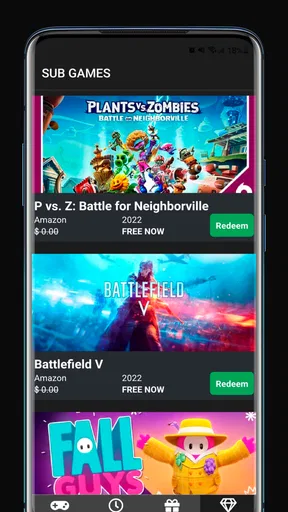
I often keep an eye out for free games, but checking several storefronts can turn a quick glance into a chore. Epic Freebie Games Radar is aimed at making those offers easier to spot: it gathers alerts and information about giveaways across PC game services, including Epic Games, Steam, Amazon, and Rockstar. I’d treat it as a discovery aid rather than a place to claim or play games; the useful part is knowing where to look and when an offer may need attention.
That distinction matters in a shared household. One person might notice a giveaway while another is deciding what to play, but the app doesn’t replace the accounts and storefronts where games are actually claimed. My practical approach would be to use it as a shared prompt—“there’s something free to check”—then let whoever owns the relevant account decide whether it belongs in their library. That keeps the excitement of a deal separate from the question of who controls the account.
Useful when several people share the gaming conversation
For a household with more than one player, the appeal is less about collecting every offer and more about reducing the chance that a worthwhile one slips past unnoticed. A parent who follows game news, for example, could check what is being offered and tell a teenager to look at the relevant storefront together. Roommates can do the same in a group chat, with one person flagging an offer and the account holder handling the claim.
This is a small but helpful distinction: spotting a free game is not the same as getting it ready for everyone to play. A giveaway may be attached to one person’s store account, and sharing a device does not make separate accounts interchangeable. I’d avoid treating a notification as permission to sign into somebody else’s account or make a claim on their behalf without agreement. The app can support coordination, but the household still needs its own clear boundaries.
Keep alerts helpful, not another source of noise
Alerts are most useful when they prompt a quick decision rather than interrupt every other task. I’d start by deciding who in the home actually wants giveaway updates, then keep the app on that person’s device or agree on a simple routine for passing along notable offers. If several people install it, it helps to decide who checks first; otherwise, everyone may send the same alert around while nobody is sure who will follow through.
A practical workflow is to notice an offer, check which storefront it belongs to, and then have the account owner review the details in that service. That extra pause is worthwhile. It reduces accidental claims under the wrong account and gives players a chance to decide whether they genuinely want the game, rather than collecting it just because it is free. If you share a phone, I’d also keep personal account access and device access separate, just as I would with any app that points toward different gaming services.
Age context and a sensible trust check
The app is rated for Everyone, which makes it broadly approachable as an information tool, but that should not be confused with a judgment about every game or offer it may surface. A giveaway can still lead to a game that is not right for every member of a family. I’d use the alert as a starting point and check the game’s own age guidance and content before a younger player claims or installs it.
Worth Reading Before You Choose

Baby Panda World Brings Quick Play to Modern Phones, but Its Game Library Feels Busy

ESPN’s Live Game View Makes Following Close Games Easier

QuizzLand Review: A Good Fit for Short Trivia Breaks, Not Every Player

Basketball Stars: Multiplayer Is Fast, but Can It Recover When Matches Go Wrong?

WEBTOON Turns Phone Updates Into a Better Reading Routine

Link to Windows Runs on Shared Habits, Not Social Feeds
That is also why I prefer a quick review of the destination before acting. The app’s role is to help people find deals; the relevant storefront remains the place to confirm the specific offer and handle the account. In a family, a parent or account holder can make that decision with the player instead of assuming that “free” means suitable. It is a simple habit, but it avoids confusing the app’s broad age rating with the content rating of individual games.
Who benefits most—and who may not
I think the strongest fit is someone who already uses PC game stores and enjoys checking occasional giveaways, especially if they do not want to visit each storefront just to see whether something is free. It can also suit a household where one person likes tracking offers and sharing the useful ones with other players. The developer, Arioch Pds - Apps & Games, has made an Events app around that specific discovery habit, rather than a general game launcher.
If you only play on a console, rarely claim PC games, or prefer to keep your phone free of deal alerts, the app may add little to your routine. A person who already checks each store directly may also prefer that habit, since it takes them straight to the source and avoids switching between an alert and a storefront. I’d choose this app when reminders and a combined discovery point are useful; I’d skip it when there is no intention to follow up on PC offers.
Compared with checking the Epic Games Store or other services one by one, the benefit is convenience; compared with relying on each store’s own updates, the trade-off is another place to monitor. It is not a substitute for browsing a store’s full catalogue, reading a game’s details, or managing a library. I find it most sensible as a lightweight radar: notice, assess, then claim through the appropriate account if the offer suits you.
The Treasure Trove of Free Games
First off, let's talk about what makes Epic Freebie Games Radar so appealing. The app does exactly what it says on the tin: it keeps you updated on all the free game giveaways from Epic Games. As a gamer who doesn't want to miss out on any freebie, this app is like having a personal assistant dedicated to keeping you in the loop.
One of the coolest features is the real-time notifications. You get an alert whenever a new game is available for free, so you can snag it before the offer expires. This is perfect for those who don’t have the time to constantly check the Epic Games Store themselves.
User-Friendly Interface
The interface is sleek and simple, designed for gamers who just want to get to the point. The main screen displays a list of current free games, complete with descriptions and expiration dates. You can easily navigate through the app without any hassle, and the layout is intuitive enough that even those who aren't tech-savvy can use it with ease.
Another neat feature is the ability to set up reminders for future game releases. This way, you can plan ahead and mark your calendar for upcoming free games. The app also includes links directly to the Epic Games Store, saving you the extra step of searching for the game yourself.
Extra Perks for Gamers
While the main focus is on free games, Epic Freebie Games Radar also provides news and updates about upcoming sales, discounts, and game releases. This makes it not just a freebie finder but a comprehensive tool for any Epic Games enthusiast.
It's like having a gaming news portal right in your pocket. The developers have also promised regular updates to improve the app further, which is always a good sign of an app that’s here to stay.
Making the habit work at home
In everyday use, I would fold the app into a quick check rather than turn it into a household project. For instance, if I’m waiting for dinner to finish and see an alert, I can note the game and ask the person whose account is relevant whether they want to claim it. If they are busy, the offer can be checked later through the storefront. This keeps a freebie from becoming an urgent family task, while still making the notification useful.
There is a small trade-off in being alert-driven: a notification can draw attention to a game before anyone has decided whether they have time for it or even want it. I’d use the reminder as a nudge to inspect, not as a reason to claim everything. A quick check of the title, the offer window, and the account that would receive it makes the process more deliberate. That is especially useful when several people use the same computer but maintain separate libraries.
What the app can—and cannot—settle
One question people may have is whether an alert means the game is already in their library. I would not assume that. The app helps identify offers, while claiming belongs to the relevant service and account; after following an offer, check the storefront itself for confirmation. This distinction is worth keeping in mind if a family member sees a notification on a shared phone and another person expects the game to appear automatically.
Another practical question is whether it replaces store browsing. Not entirely. It can save the repetitive step of checking several services just to discover current freebies, but direct browsing is still better when you want to compare editions, inspect a game’s details, or explore a wider catalogue. I’d open the app when I want a quick scan and go to the store when I’m ready to make a decision.
It is also worth being realistic about the value of a free game. A title is only a useful pickup if someone in the household can play it and wants it. For people with limited storage, limited gaming time, or a preference for one platform, collecting every offer can create clutter without much benefit. I would prioritize games that fit the player’s interests and setup, rather than treating a growing library as a goal in itself.
Who should pass, and how I would decide
This is not the right choice for someone seeking a unified place to manage every game, launch titles, or share a family library. Its appeal is narrower: finding giveaway information and keeping an eye on events. If you want complete control from one store, or already have a dependable routine for checking the services you use, sticking with those services may be simpler. The app makes most sense when discovering offers is the part you currently forget or find tedious.
For a household, I’d agree on two boundaries before making it part of the routine: whose account receives a game, and who is responsible for checking the game’s suitability. That does not require elaborate rules. A message with the title and destination may be enough, followed by a decision from the account holder. This avoids confusing shared interest in a game with shared ownership of an account or library.
The app is free, and its broad appeal is reflected in an average rating of 4.4 from around 22,000 ratings, with over five million installs. It is marked Everyone, first released on April 27, 2022, and its current version is 6.0.3, with Android 7.0 or later listed as the minimum system requirement. Those details make it easy to judge basic fit, but the more important question is whether you actually want to keep track of PC giveaways.
Final Thoughts
In a nutshell, Epic Freebie Games Radar is a must-download for anyone who loves gaming and scoring free stuff. It’s efficient, user-friendly, and keeps you in the know about all the amazing offers on the Epic Games Store. Whether you’re a hardcore gamer or just someone who loves a good deal, this app is worth checking out.
So, if you're ready to never miss out on a free game again, give this app a whirl. You won't regret it—and neither will your wallet!
My own recommendation is a little more measured: I’d try it if free PC games are already part of your routine, and I’d use it as a reminder to check an offer rather than a promise that every alert deserves action. In a shared home, that small distinction makes the app easier to live with: one person can spot an opportunity, the account holder can decide, and everyone can check that the game suits the intended player. If that sounds useful, it is a straightforward way to keep giveaways on your radar without making them the centre of your gaming life.
Pros
- Easy navigation and user interface.
- Instant notifications for new deals.
- Wide range of game genres covered.
- Regularly updated with latest freebies.
- Customizable alert settings.
Cons
- Ads can be intrusive at times.
- Limited to Epic Games Store exclusives.
- Requires constant internet connection.
- Occasional app crashes reported.
- No in-app purchase tracking.
FAQs for Epic Freebie Games Radar
What is Epic Freebie Games Radar and how does it work?
Epic Freebie Games Radar is an app designed to alert users about free game giveaways from the Epic Games Store. It aggregates information on new and upcoming free games, allowing users to easily access these offers. The app provides notifications, ensuring you never miss a free game opportunity.
Is Epic Freebie Games Radar free to use or are there in-app purchases?
Yes, Epic Freebie Games Radar is completely free to use. There are no hidden charges or in-app purchases. The main purpose of the app is to provide users with timely information about free games, ensuring a cost-free experience while maximizing your gaming library.
How reliable are the notifications from Epic Freebie Games Radar?
The app is designed to provide highly reliable notifications. It sources information directly from the Epic Games Store and updates regularly. You can customize settings to ensure you receive alerts in real-time, minimizing the chance of missing out on any offers.
Can I download games directly from Epic Freebie Games Radar?
No, the app does not allow direct downloads of games. Instead, it directs users to the Epic Games Store where they can claim and download the games. This ensures you are accessing games securely and legally through the official store.
Does Epic Freebie Games Radar require a lot of storage or data usage?
Epic Freebie Games Radar is designed to be lightweight, requiring minimal storage space on your device. It primarily uses an internet connection to update game listings and send notifications, but the data usage is optimized, ensuring it remains low without compromising functionality.


